Install the app
How to install the app on iOS

Follow along with the video below to see how to install our site as a web app on your home screen.

Note: This feature may not be available in some browsers.

Speeding up the NAS

810
246
NAS
DS918+
Operating system
  1. macOS
Mobile operating system
  1. iOS
Last edited:
Apologies if this is in the wrong area. Mods, please feel free to move it :)

I'm looking to speed up my NAS. I've some packages I want to stop or don't think I need so can uninstall
  1. Hybrid Share - I did have a task to remove this but it no longer works
  2. Active Insight - I did have a task to remove this but it no longer works
  3. Node.JS 18 (I think I can uninstall this - was used by HomeBridge)
  4. Node.JS 20 (I think I can uninstall this - was used by HomeBridge)
  5. PHP 8.1 - As not used by Webstation and phpMyAdmin - can this be uninstalled
  6. PHP 8.2 - Used by phpMyAdmin (dependant package)
  7. PHP 8.4 - Used by WebStation

Screenshot 2026-02-10 at 14.23.57.JPG

So:
  • New removal scripts for 1) and 2) if they exist.
  • Confirmation I can uninstall 3), 4) and 5)
Any other suggestions on what I can trim down or turn off to speed things up. As always any / all thoughts are appreciated.

Hmm my good lady is watching a movie via Plex, have just noticed Memory usage is 2.25Gb of my 4Gb. That's not helping. I'll have to look at this when she has stopped watching. :) [Update: Down to 89Mb Heck!)
 
Agreed it would well help. I'd be very nervous in a) finding the right memory and b) pulling the NAS apart and fitting it.

I always have issues with the hardware side of things (high static body charge).
 
I've uninstalled:
  • Node.JS 18
  • PHP 8.1
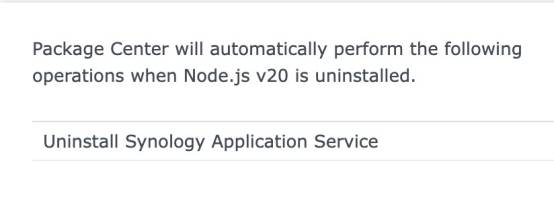
I left Node.JS 20 as when I looked to uninstall it I got:

Screenshot 2026-02-10 at 18.33.10.JPG
Which looked a bit worrying.
 
Last edited:
As far as I’m aware no, would I know if I was using any of them? Are they not needed for other apps?

Synology Application services has been disabled to see if anything breaks.
 
Thanks, hmm the notifications I may miss. Unless mobile notifications for logging in, etc., are not covered under this?

Reading more closely - I don't use 'Drive, MailPlus, Chat, Calendar, and Contacts' so I think I'm safe to get rid of it.
 
notifications for logging in, etc., are not covered under this?
Completely separate. Still, check things out. Disabling the package is a good way to see what is missing. Unless you are in a collaborative set up, I doubt you are using this. Let us know what you find.
 
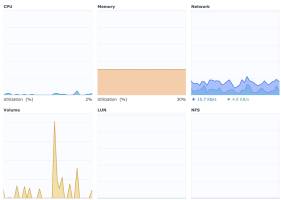
As stated above 'Synology Application Service' was disabled overnight with no issues. So today I've uninstalled it along with Node.js 20. No issues and after making the above changes the NAS load has been reduced:
Screenshot 2026-02-11 at 09.54.52.JPG

The only other package I could look to remove is the older version of Python but there isn't the option to remove it, alas.

Homebridge is looking a lot happier too!
Screenshot 2026-02-11 at 10.05.51.JPG
 
nosy: what was the before vs after results. Workload on NAS.
Am I correct that only ‘after’ was shown?
 
I didn't keep copies of the original figures, is the info 'up thread' useful?
 
I agree with Telos - adding RAM is the best solution here. Just like a PC - the more applications you run, the more processing power and memory you need.
 
Yep, I'll have to find out what RAM I'd need I guess and find a video to see how painful it'd be to do. Then see if the CFO (wife) would sanction the spend.
But if the average memory usage is only about 30% is it worth going down that route?
 
Appreciated, I'll look later. A visit family day today. I think things are looking okay, no excessive peaks. Although I do wonder if the 'Volume' should be constantly writing?


Screenshot 2026-02-12 at 14.20.34.JPG


Memory is looking like:
Screenshot 2026-02-12 at 14.21.21.JPG


And CPU usage:

Screenshot 2026-02-12 at 14.21.46.JPG


Does that all look acceptable?
 
Volume issue resolved :)
Screenshot 2026-02-12 at 19.01.52.JPG
It seems it was related to Talescale........ I've opened a ticket with them.
 
  • Turned off Tailscale (as that seemed to trigger the volume usage).
  • Temporarily turned off Plex. I'm looking to see if my Old Mac Mini can take over the task
  • Modified Cloudflare (web station runs my forum) to improve caching, and block various countries)
Things continue to improve:
Screenshot 2026-02-13 at 13.11.27.JPG


I did look at the YT video on fitting the memory; it looks as scary as heck to me. Large fingers with a lack of sensitivity due to nerve damage. So I think I'll hold off on that for the far future. :)
 
  • Turned off Tailscale (as that seemed to trigger the volume usage).
  • Temporarily turned off Plex. I'm looking to see if my Old Mac Mini can take over the task
  • Modified Cloudflare (web station runs my forum) to improve caching, and block various countries)
Things continue to improve:
View attachment 33275

I did look at the YT video on fitting the memory; it looks as scary as heck to me. Large fingers with a lack of sensitivity due to nerve damage. So I think I'll hold off on that for the far future. :)
It is seriously very easy to add/replace RAM in most NAS models....
 
Not for me – a high-static body charge and fingers with hardly any feelings.... I dare not risk it.
 

Create an account or login to comment

You must be a member in order to leave a comment

Create account

Create an account on our community. It's easy!

Log in

Already have an account? Log in here.

Popular tags from this forum

Welcome to SynoForum.com!

SynoForum.com is an unofficial Synology forum for NAS owners and enthusiasts.

Registration is free, easy and fast!

Trending content in this forum

Back
Top